
0x00 前言
Shodan是一个针对网络设备的搜索引擎,通过Shodan API进行搜索,不仅数据更加丰富,而且能够配合自己的程序实现自动化分析。
本文将要介绍Shodan API在使用过程需要注意的问题,分享使用心得和脚本开发技巧。
0x01 本文将要介绍以下内容
-
Shodan API的简单使用
-
利用python调用Shodan API获得搜索结果
-
对搜索结果作进一步处理
-
三种积分(credits)的区别
-
通过Shodan官网导出搜索结果和进一步处理
0x02 Shodan API的简单使用
1、注册账号,获得API Key
测试API Key为:SkVS0RAbiTQpzzEsahqnq2Hv6SwjUfs3
2、安装python包
pipinstallshodan
3、通过Shodan CLI获得搜索结果
注:
未付费只能获得100个搜索结果
CLI全称为command-line interface,即shodan的命令行模式
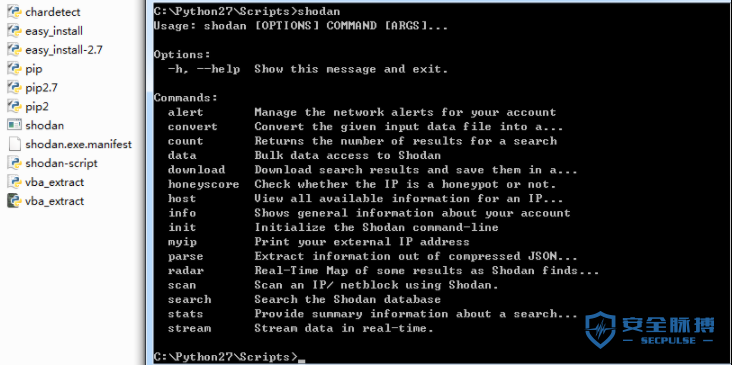
Windows系统下使用pip install在同级目录产生文件Shodan.exe
如下图
(1) 初始化
shodaninit<apikey>
实际命令为:
shodaninitSkVS0RAbiTQpzzEsahqnq2Hv6SwjUfs3
如下图

(2) 搜索指定内容(apache)的数量
shodancountapache
如下图

获得结果23803090
(3) 搜索指定内容(apache)的信息
shodansearch--fieldsip_str,port,org,hostnamesapache
搜索关键词:apache
输出:ip_str,port,org,hostnames
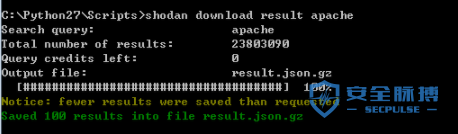
(4) 下载指定内容(apache)的搜索结果
shodandownloadresultapache
搜索关键词:apache
如下图
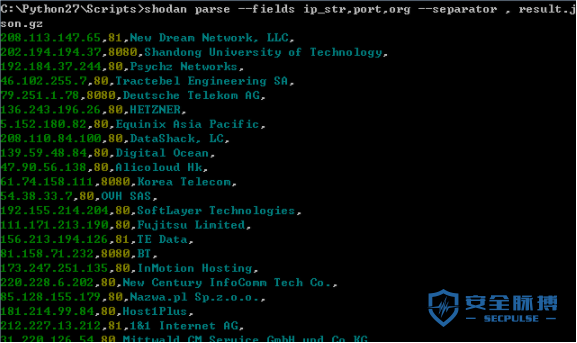
(5) 解析文件,获得搜索结果
shodanparse--fieldsip_str,port,org--separator,result.json.gz
如下图
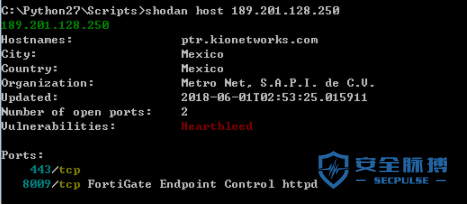
(6) 搜索指定IP的信息
shodanhost189.201.128.250
如下图
0x03 三种积分(credits)的区别
Shodan共有三种积分(credits):
-
Export credits
-
Query credits
-
Scan credits
官方文档:
https://help.shodan.io/the-basics/credit-types-explained
简单理解:
Export Credits
通过Shodan官网下载数据时使用
1 export credit = 10,000 results
注:
导出一次结果消耗一个credit,无论获取到的结果有多少,最多为10000个结果
月初不会更新
Query Credits
调用Shodan API时使用
1 query credit = 100 results
月初更新,也就是说如果只买了一个月的会员,那么下一个月清零
Scan Credits
调用Shodan API时使用
1 scan credit = 1 IP
月初更新
0x04 通过python调用Shodan API获得搜索结果
注:
未付费不仅无法使用搜索过滤条件,而且只能获得100个搜索结果
(1) 搜索指定内容(apache)的信息
python代码如下:
importshodan
SHODAN_API_KEY="SkVS0RAbiTQpzzEsahqnq2Hv6SwjUfs3"
api=shodan.Shodan(SHODAN_API_KEY)
try:
results=api.search('Apache')
print'Resultsfound:%s'%results['total']
forresultinresults['matches']:
print("%s:%s|%s|%s"%(result['ip_str'],result['port'],result['location']['country_name'],result['hostnames']))
exceptshodan.APIError,e:
print'Error:%s'%e
如下图
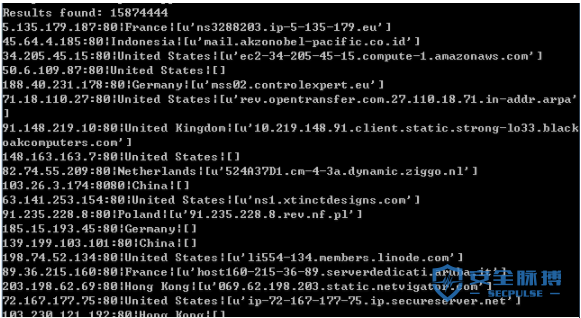
如果未付费,无法使用搜索过滤条件,例如Apache country:"US"
(2) 搜索指定内容,将获得的IP写入文件
python代码如下:
importshodan
SHODAN_API_KEY="SkVS0RAbiTQpzzEsahqnq2Hv6SwjUfs3"
api=shodan.Shodan(SHODAN_API_KEY)
file_object=open('ip.txt','w')
try:
results=api.search('Apache')
print'Resultsfound:%s'%results['total']
forresultinresults['matches']:
#printresult['ip_str']
file_object.writelines(result['ip_str']+'\n')
exceptshodan.APIError,e:
print'Error:%s'%e
file_object.close()
(3) 通过命令行参数指定搜索条件,将搜索到的IP写入文件
python代码如下:
importshodan
importsys
SHODAN_API_KEY="SkVS0RAbiTQpzzEsahqnq2Hv6SwjUfs3"
api=shodan.Shodan(SHODAN_API_KEY)
iflen(sys.argv)<2:
print'[!]Wrongparameter'
sys.exit(0)
print'[*]Searchstring:%s'%sys.argv[1]
file_object=open('ip.txt','w')
try:
results=api.search(sys.argv[1])
print'[+]Resultsfound:%s'%results['total']
forresultinresults['matches']:
#printresult['ip_str']
file_object.writelines(result['ip_str']+'\n')
exceptshodan.APIError,e:
print'Error:%s'%e
file_object.close()
search.pyapache
注:
如果搜索多个关键词,需要用引号将搜索条件包含,例如:
search.py"apachecountry:US"
(4) 读取文件中的IP列表,反查IP信息
python代码如下:
importsys
reload(sys)
sys.setdefaultencoding('utf8')
SHODAN_API_KEY="SkVS0RAbiTQpzzEsahqnq2Hv6SwjUfs3"
api=shodan.Shodan(SHODAN_API_KEY)
defsearchip(str):
try:
host=api.host(str)
exceptshodan.exception.APIError:
print"[!]Noinformationavailable"
print"---------------------------------------------"
return
else:
#Printgeneralinfo
try:
print"IP:%s\r\nOrganization:%s\r\nOperatingSystem:%s"%(host['ip_str'],host.get('org','n/a'),host.get('os','n/a'))
exceptUnicodeencodeError:
print"[!]UnicodeEncodeError\r\n"
else:
#Printallbanners
foriteminhost['data']:
print"Port:%s\r\nBanner:%s"%(item['port'],item['data'])
print"---------------------------------------------"
return
file_object=open('ip.txt','r')
forlineinfile_object:
searchip(line)
0x05 通过Shodan官网下载搜索结果
通过Shodan官网下载数据时使用Export credits,如下图
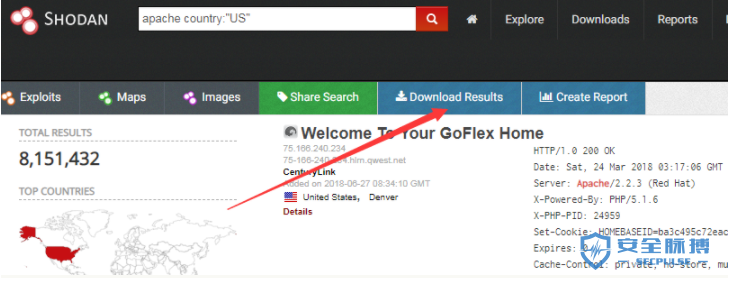
查询一次消耗一个export credit,无论结果有多少个,最多为10000个
导出格式选择为json
(1) 从下载的json结果文件中提取IP
python代码如下:
importjson
file_object=open("shodan_data.json",'r')
forlineinfile_object:
data=json.loads(line)
printdata["ip_str"]
file_object.close()
(2) 从下载的json结果文件中提取指定国家的IP和端口
国家代号在二级元素中,对应结构:data["location"]["country_code"]
python代码如下:
importjson
importsys
importre
defsearch(country):
file_object=open("shodan_data.json",'r')
file_object2=open(country+".txt",'w')
forlineinfile_object:
data=json.loads(line)
ifre.search(data["location"]["country_code"],country,re.IGNORECASE):
str1="%s:%s"%(data["ip_str"],data["port"])
printstr1
file_object2.writelines(str1+'\n')
file_object.close()
file_object2.close()
if__name__=="__main__":
iflen(sys.argv)<2:
print('[!]Wrongparameter')
sys.exit(0)
else:
print('[*]Searchcountrycode:%s'%sys.argv[1])
search(sys.argv[1])
print("[+]Done")
命令行参数:
search.pyUS
生成文件US.txt,保存IP和对应的端口
0x06 小结
本文介绍了Shodan API的用法,分享使用心得和python脚本开发技巧。选择付费购买时,记得区分好三种积分(credits)

评论(0)